Find out what
really affects your mood.
Check in once a day: rate your mood and tick what happened. Nomos compares your better and worse days with honest statistics and shows what goes with each. Zero accounts. Zero internet permissions. 100% on your phone.
How Nomos works
A daily check-in, honest statistics, and your habits, all on your phone.
One check-in a day
Rate your mood with five faces and tick what happened: sleep, exercise, coffee, friends. Leave unticked what didn't happen; that's data too. "Same as the day before" fills in a routine day, and you can answer straight from the evening reminder or the Mood widget on your home screen.
- Five faces, from Awful to Great
- Your activities as one-tap chips
- Answer from the reminder notification or the 4×1 Mood widget
- Your mood is never filled in with a default value
What affects your mood
Nomos compares the days you did something with the days you didn't, on the same day and the day after, and lists every tracker as Likely, No clear effect or Collecting, with how many more days it still needs.
- Same-day and next-day links (last night's drinks, today's mood)
- False-discovery control, so random coincidences don't turn into findings
- Says "No clear effect" instead of inventing a link
- First trends after 2–3 weeks of check-ins, solid answers in 4–6
A link is a pattern in your own data, not proof of cause.
Habits, heatmaps and one-tap logging
Every habit, symptom or amount gets its own button: one tap records it with your usual value, and one more tap changes the amount or time. Heatmaps and period-aware streaks show your consistency over weeks and months.
- One-tap logging with your default values (e.g. 1000 ml water)
- Now / 1h ago / Last night / Yesterday shortcuts
- 52-week heatmaps, monthly and weekday charts
- Daily, weekly and monthly goals with honest streaks
Multi-Scale Temporal Analytics
Experience honest habit momentum with Pixela/GitHub-style contribution matrices, real-time anchoring, and deep temporal drilldowns.
What affects your mood
Every tracker is compared with your mood: on the days you did it versus the days you didn't, and on the day after.
Mood Comparison Feed
Example| Tracker | Change in mood (1–5) | Status |
|---|---|---|
| Alcohol | −1.1 | Likely · day after |
| Exercise | +0.7 | Likely · same day |
| Slept badly | −0.7 | Likely · same day |
| Friends | +0.3 | No clear effect · 71 vs 192 days |
| Magnesium | — | Collecting · needs 3 more days without it |
*Likely = passed the false-discovery check. Still a correlation, not proof of cause. Nomos checks for confounders and filters out chance findings before it shows you anything.
Test a suspicion with a personal trial
Personal trial →Skip it for a while, then do it as you usually do, and compare the days.
Skip the suspect, for example late coffee. Log how you feel as usual (sized to how often you usually do it).
Do it as you usually do, no more than usual. Log it each time.
Nomos compares your mood or symptom on the days you did it with the days without it. It needs at least 4 such days.
*Trials start from a pattern card in Discoveries. Rating cards such as "Alcohol ➔ Mood" don't offer one yet.
Designed for Speed, Clarity, & Privacy
Experience authentic Material 3 dark aesthetics, smooth Compose animations, and complete offline autonomy before downloading.
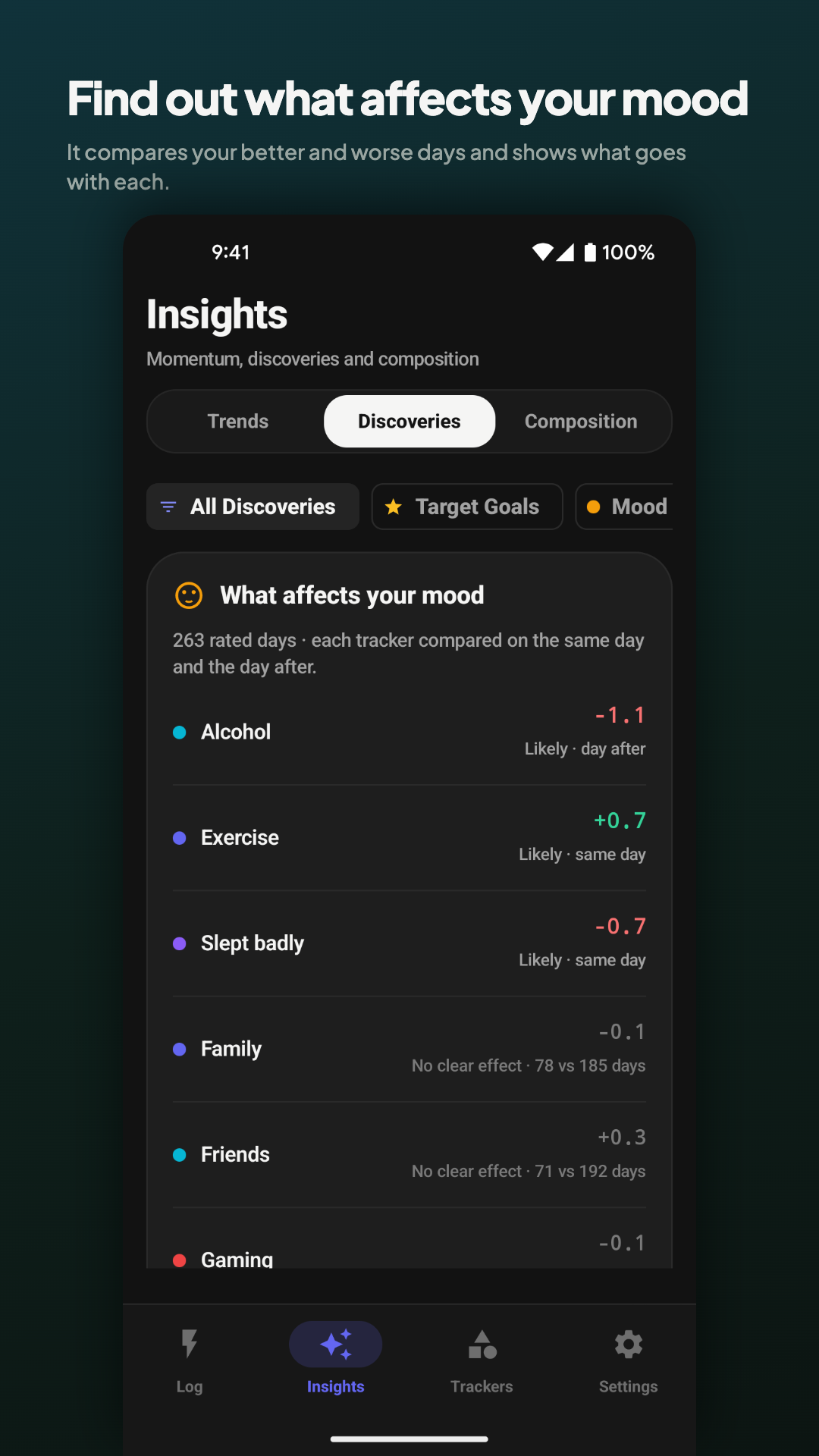
Find out what affects your mood
Compares your mood on days you did an activity versus days you didn't, on the same day and the day after.
Same-day & next-day links · False-discovery control · Clear effect labels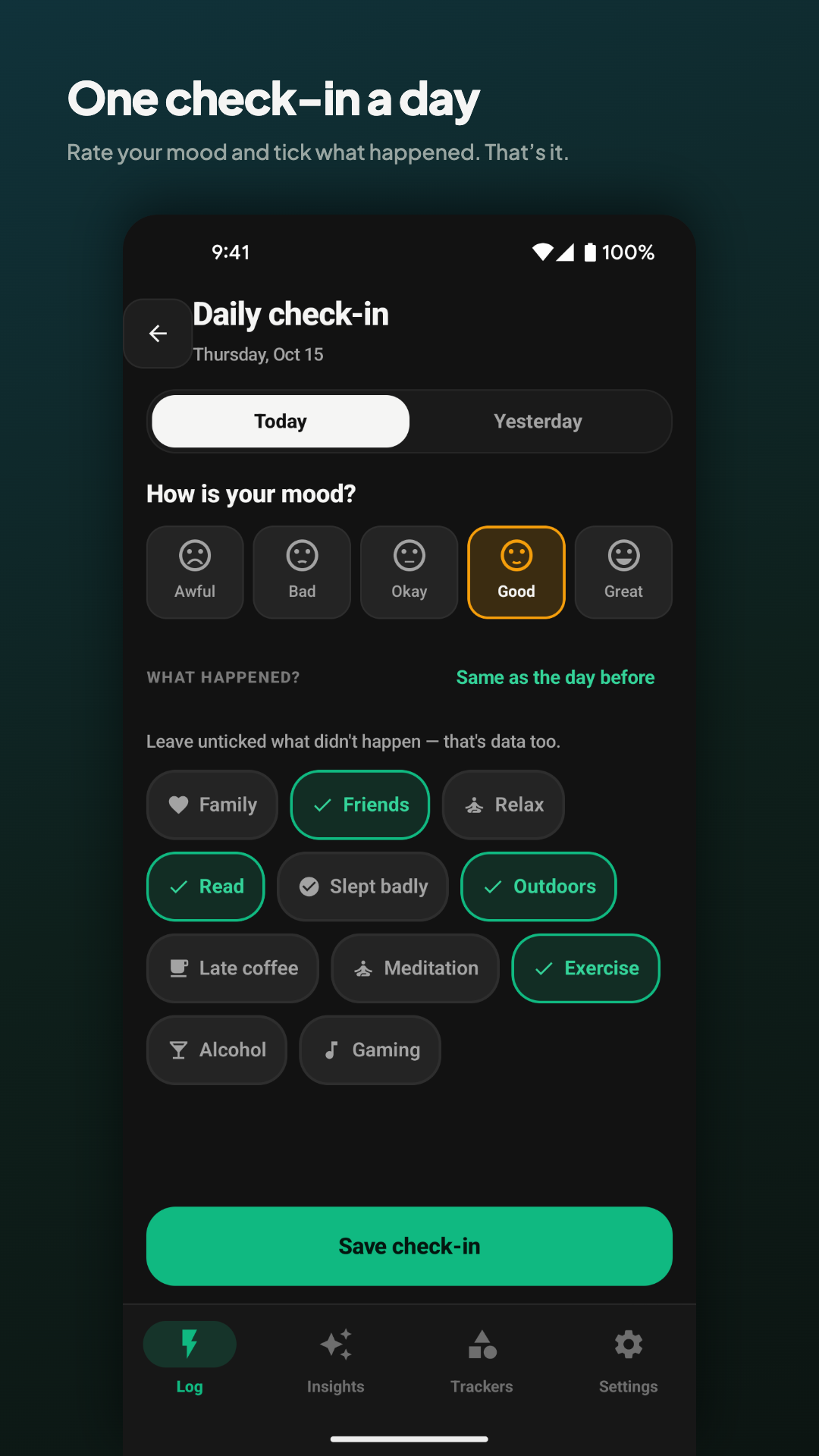
One check-in a day
Rate your mood with five faces and tick your activities in seconds. Answer from notifications or the widget.
Five mood faces · One-tap activity chips · Home-screen widget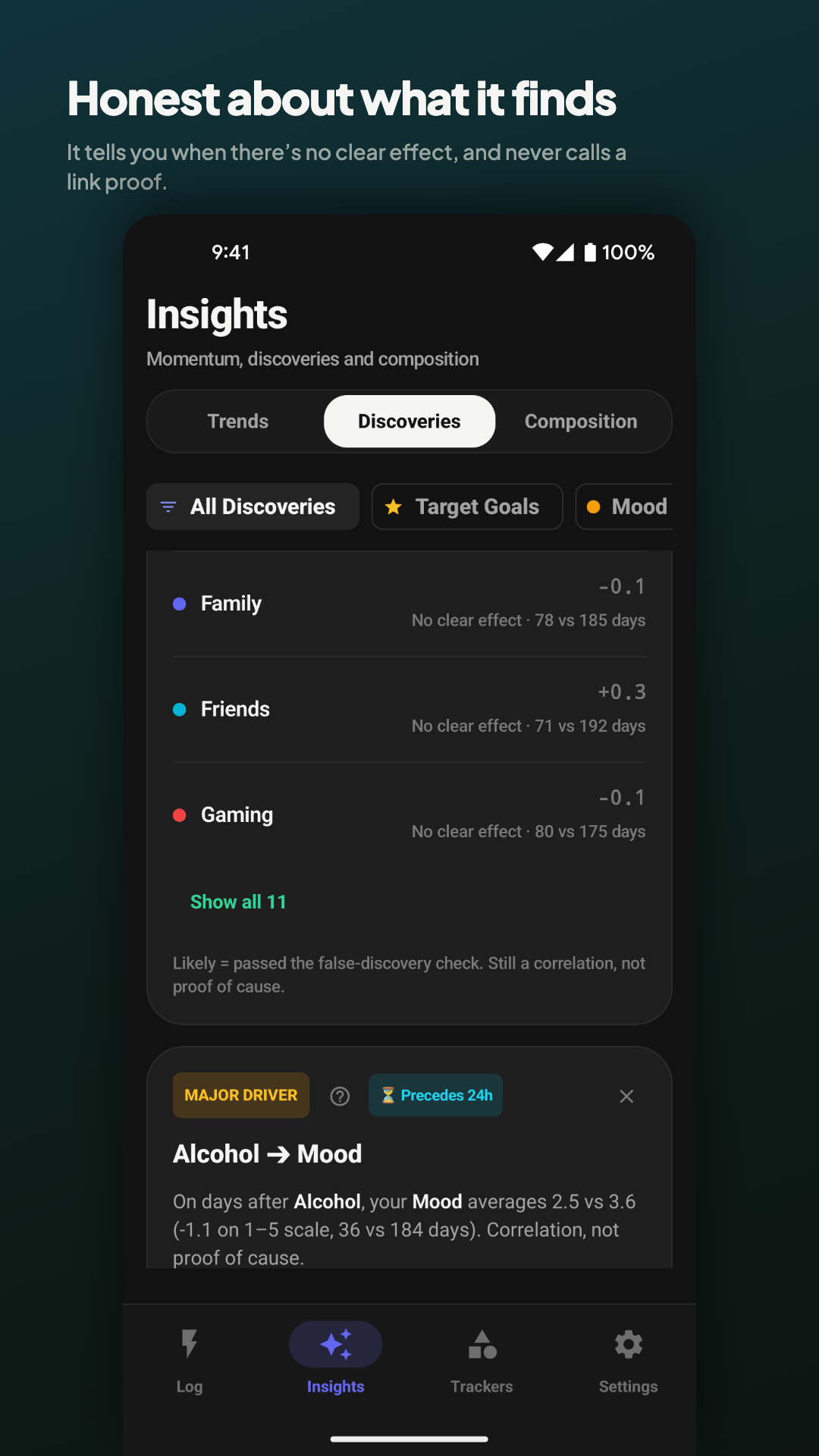
Honest about what it finds
Says "No clear effect" instead of inventing a link, and never calls a link proof.
No clear effect labels · False-discovery control · Collecting progressFind out what affects your mood
Compares the days you did an activity with the days you didn't, on the same day and the day after.
Complete Data Ownership & Portability
No vendor lock-in. Export, encrypt, backup, or import your mood and habit history whenever you want.
AES-256-GCM Encrypted Snapshots
Export complete encrypted .backup archives protected by your custom password. Perfect for secure device migrations without cloud exposure.
Loop Habit Tracker Importer
Migrate your entire habit history from Loop Habit Tracker in seconds. Automatically scales integer multipliers, preserves streaks, and transfers target frequencies.
Daylio Importer
Bring your mood history from Daylio. Import its backup file (Daylio → Backup & Restore → Advanced Options → Export, no Premium needed) or its CSV export: moods, activities and notes come across, so "What affects your mood" can show results on the first day.
Open JSON & CSV Exports
Your data is truly yours. Export human-readable JSON files and clean spreadsheets compatible with Python, R, Excel, or custom analysis pipelines.
Zero Storage Footprint Leaks
Uses modern Android Storage Access Framework (SAF) system contracts. Nomos never asks for broad file system permissions.
Technical Security Guarantee: Zero Network Permissions
Nomos does not declare android.permission.INTERNET in its AndroidManifest.xml. The Android operating system physically prevents the app from opening network sockets, making remote data leakage architecturally impossible.
Privacy Policy
Last updated: 26 October 2026
Smerio Nomos is engineered from the ground up as a 100% local-first, zero-telemetry mood and habit tracker. We believe that your personal routines, daily symptoms, statistical patterns, and lifestyle experiments belong solely to you.
0 User Accounts
No registration, no passwords, no email signups, and no phone numbers required.
Zero Internet Permissions
Nomos does not declare network permissions. Your data is never sent to us or to anyone else.
0 Remote Servers
Zero analytics SDKs, zero advertising trackers, and no servers of ours.
1. Information We Do NOT Collect
Smerio Nomos does not harvest, store, or transmit any personally identifiable information (PII) or device metadata. Specifically, we do not collect:
- Names, email addresses, phone numbers, or account credentials.
- Advertising IDs (AAID), hardware identifiers (IMEI, MAC address), or device fingerprints.
- GPS location, WiFi identifiers, or network telemetry.
- In-app behavioral telemetry, click tracking, or usage statistics.
2. Architectural Zero-Network Security
Unlike most wellness apps that store your habits on remote servers, Nomos enforces privacy at the operating system level:
android.permission.INTERNET in its application manifest. The Android OS physically prevents the app from initiating or receiving any network connections.3. Permissions Nomos Uses
None of these permissions allow network access.
| Permission | Why |
|---|---|
Notifications (POST_NOTIFICATIONS) | Daily check-in and goal reminders, logging confirmations with Undo, and the time of a running timer with its alerts ("Still working?", "25 min done"). |
Alarms & reminders (SCHEDULE_EXACT_ALARM) | Optional. Lets a countdown timer alert you the moment it ends, and a stopwatch ask "Still working?" after an hour. You allow it in Android's settings; without it the alert may come a few minutes late. |
Read steps (android.permission.health.READ_STEPS) | Optional. Shows your daily steps from Health Connect, if you connect it. |
Read sleep (android.permission.health.READ_SLEEP) | Optional. Shows how long you slept each night from Health Connect, if you connect it. |
Biometric / fingerprint (USE_BIOMETRIC, USE_FINGERPRINT) | Optional app lock. Handled by Android; Nomos never sees your biometric data. |
Run at startup, keep awake, foreground service (RECEIVE_BOOT_COMPLETED, WAKE_LOCK, FOREGROUND_SERVICE) | Used by Android's WorkManager to keep reminders and the on-device analysis scheduled after a restart, and to bring back a timer that was running when the phone restarted. |
Reminder notifications show tracker and goal names only when your phone is unlocked. The lock-screen version is generic.
4. On-Device Data Storage & Encryption
All your habits, logged entries, modular attributes, and N-of-1 trial histories are saved strictly within your phone's sandboxed local Room/SQLite database.
This can include sensitive personal information you choose to record, such as mood ratings, symptoms, sleep, medication or alcohol use, and, if you connect Health Connect, your daily steps and sleep. It is treated exactly like everything else: stored only on your phone and never sent to us.
Timers work the same way: while a stopwatch or countdown runs, Nomos keeps its start time on your phone, and when you stop it the time spent is saved as a log like any other.
- AES-256-GCM Encrypted Snapshots: When creating a backup, Nomos encrypts your entire database using AES-256-GCM authenticated encryption with a user-supplied password.
- Storage Access Framework (SAF): Export and import operations rely solely on system-level file pickers without requiring broad file storage permissions.
Android Auto Backup & device transfer
If backup is turned on in your Android settings, Android may back up Nomos's data (your logs and settings) to your private Google Drive account, or copy it directly when you move to a new phone. Android only uploads it to the cloud when your phone can encrypt it (a screen lock is set). This backup is run by Android and Google Play services, not by Nomos. We have no access to it. Widget settings and app-lock settings are never included. You can turn this off at any time in your phone's backup settings.
5. Health Connect (Steps and Sleep)
If you choose to connect Health Connect, Nomos reads two kinds of data from it:
- Steps: your total number of steps for each day.
- Sleep: your sleep sessions (when you fell asleep and woke up, and when you were awake during the night), which Nomos turns into the time you slept each night.
Nomos does not read any other Health Connect data, and it never writes, changes or deletes data in Health Connect.
How it's used. Steps and sleep appear as trackers in Nomos, next to the moods and habits you log yourself. Nomos uses them for your goals, your Trends, and to compare your mood on days with more or fewer steps, and after longer or shorter nights, than usual. This all happens on your phone.
Where it goes. Nowhere. Nomos has no internet access, so this data is never sent to us or anyone else. It is never sold, never shared, and never used for advertising.
When it's read. Only while Nomos is open on your screen. Nomos never reads in the background. When you first connect, it reads your last 30 days.
Backups. The days Nomos has read are stored in Nomos's own database on your phone. That means they are included in backups you make yourself (encrypted with your password) and in Android's own backup if you have turned that on (see “Android Auto Backup & device transfer”).
Stopping. You can turn access off at any time in Health Connect (search for “Health Connect” in your phone's Settings, or open the Health Connect app on older phones), or choose Stop reading from Health Connect on the tracker in Nomos. There you can keep the days already read or delete them. Health Connect keeps its own copy either way.
6. Third-Party Services & Analytics
Smerio Nomos contains zero third-party SDKs, analytics frameworks, or advertising networks. There is no Google Firebase Analytics, Meta SDK, Mixpanel, Sentry, or third-party telemetry bundled into the application.
7. Data Retention, Portability & User Rights
Because your data is stored exclusively on your physical device, you maintain full, unrestricted data sovereignty:
- Export Anytime: You can export your full database to plain JSON or standard CSV spreadsheets at any time.
- Health Connect Data: On the Steps or Sleep tracker, choose Stop reading from Health Connect → Delete them to remove the days Nomos has read. To remove the data from Health Connect itself, use the Health Connect settings or the app that recorded it.
- Erase Data: Delete individual entries or trackers in the app, or erase everything at once in Settings → Data & backup → Erase all data. You can also use Android Settings → Apps → S Nomos → Clear storage.
- Permanent Deletion: Uninstalling the application immediately and irreversibly deletes all stored logs and local settings.
8. Children's Privacy (COPPA & GDPR-K)
Nomos does not knowingly collect or solicit any personal information from children under the age of 13 (or 16 in the European Economic Area). Because the app collects no personal information whatsoever from any user, it is fully compliant with COPPA and GDPR-K.
9. Google Play Store Declarations & Contact
For the Google Play Store Data Safety form declarations:
- Data Collected: None (0 bytes transmitted).
- Data Shared: None (0 third parties).
- Encryption in Transit: N/A (Local-first architecture).
If you have questions regarding this Privacy Policy, your data rights, or Google Play compliance, contact our team:
Install Smerio Nomos on Android
Nomos is available directly on Google Play. 100% offline, zero trackers, zero network permissions, and password-protected AES-256-GCM backups.
Get it on Google Play
Download Nomos immediately to your Android device with a single click. No mandatory group memberships or waitlists required. Experience fast 1-tap habit logging and on-device statistical discovery.
Interested in upcoming experimental builds? Join the optional Beta channelDetails ▾
We test new statistical models, custom visualization scales, and automated N-of-1 trial protocols with community testers before general deployment.
Join Tester Group
Join the official Smerio Nomos Google Group to authorize your account for pre-release tracks.
Join Google GroupOpt-in on Play Store
Open Google Play testing opt-in and click "Become a tester" with one click.
Opt-in on Play StoreGet Beta Builds
Install or update Nomos from Google Play to automatically receive upcoming experimental features.
Open in Play StoreFeedback, Ideas & Feature Requests
Post your feature ideas in the group forum or send direct emails to the core development team:
Frequently Asked Questions
Everything you need to know about Nomos architecture, statistical engines, and data sovereignty.
How long until I see results?
Nomos needs enough days both with and without each activity before it can say anything. Most people see first trends after 2–3 weeks of daily check-ins and solid answers after 4–6. Until then, each tracker shows how many more days it needs. If you import your history from Daylio, you can see results on the first day.
Is this medical advice?
No. Nomos shows patterns in the data you record yourself. A link means two things tend to go together in your history, not that one causes the other. Talk to a doctor about health decisions.
How does Smerio Nomos differ from Loop Habit Tracker and other apps?
While Loop is an excellent binary habit tracker, Nomos extends life logging into modular multi-attribute tracking (ratings 1–5, numeric values with units, boolean tags) and automated statistical inference. Nomos doesn’t just record whether you did a habit—it automatically runs Chi-Square tests, Odds Ratios, and personal trials to tell you how habits affect each other.
What are N-of-1 personal trials and why do they matter?
An N-of-1 trial is a small experiment with one person: you. If you suspect a habit (like late coffee) affects how you feel or a symptom (like poor sleep or reflux), Nomos runs it in two phases sized to how often you usually do it, from 1 to 4 weeks each: first without it, then with it as usual. It then compares the days you did it with the days without it and labels the result, for example "Likely worse" or "No clear effect". It's supporting evidence for you, not medical proof. More in How Discoveries work › Personal trials.
How does Nomos guarantee privacy with zero internet permissions?
Nomos does not include android.permission.INTERNET in its application manifest. The Android operating system physically forbids Nomos from opening network connections. The app itself cannot transmit data to any server, ad network or cloud database.
How do I backup or transfer my data to a new device?
Under Settings → Data & backup, you can generate a password-protected .backup snapshot encrypted with AES-256-GCM. You can safely transfer this file to your new device via USB, local SD card, or private drive, and restore it in one tap.
Can I import my existing data from Loop Habit Tracker, Daylio or spreadsheets?
Yes. Nomos imports Loop Habit Tracker’s .zip export and Daylio’s backup file (or its CSV export): your moods, activities and notes come across, so "What affects your mood" can show results from your existing history straight away. It also supports generic CSV spreadsheet imports.
How do I download Smerio Nomos on Android?
You can download Smerio Nomos directly from the Google Play Store with a single tap. Simply search for "Smerio Nomos" or visit play.google.com/store/apps/details?id=io.smer.nomos. No waitlists, accounts, or complex onboarding required.
Which Android versions and devices are supported?
Nomos supports Android 8.0 (API level 26) and above. It is fully optimized for Android 14 and Android 15 with native Material 3 design, light and dark themes, and edge-to-edge support.